Pocket RF Predator — LilyGO T-Embed CC1101 Plus + Bruce Firmware
From “cute dev board” to fully armed, permission-only red-team radio terminal
Written by 4cid.burn · November 2025 · The Undergrid
Why this little brick matters
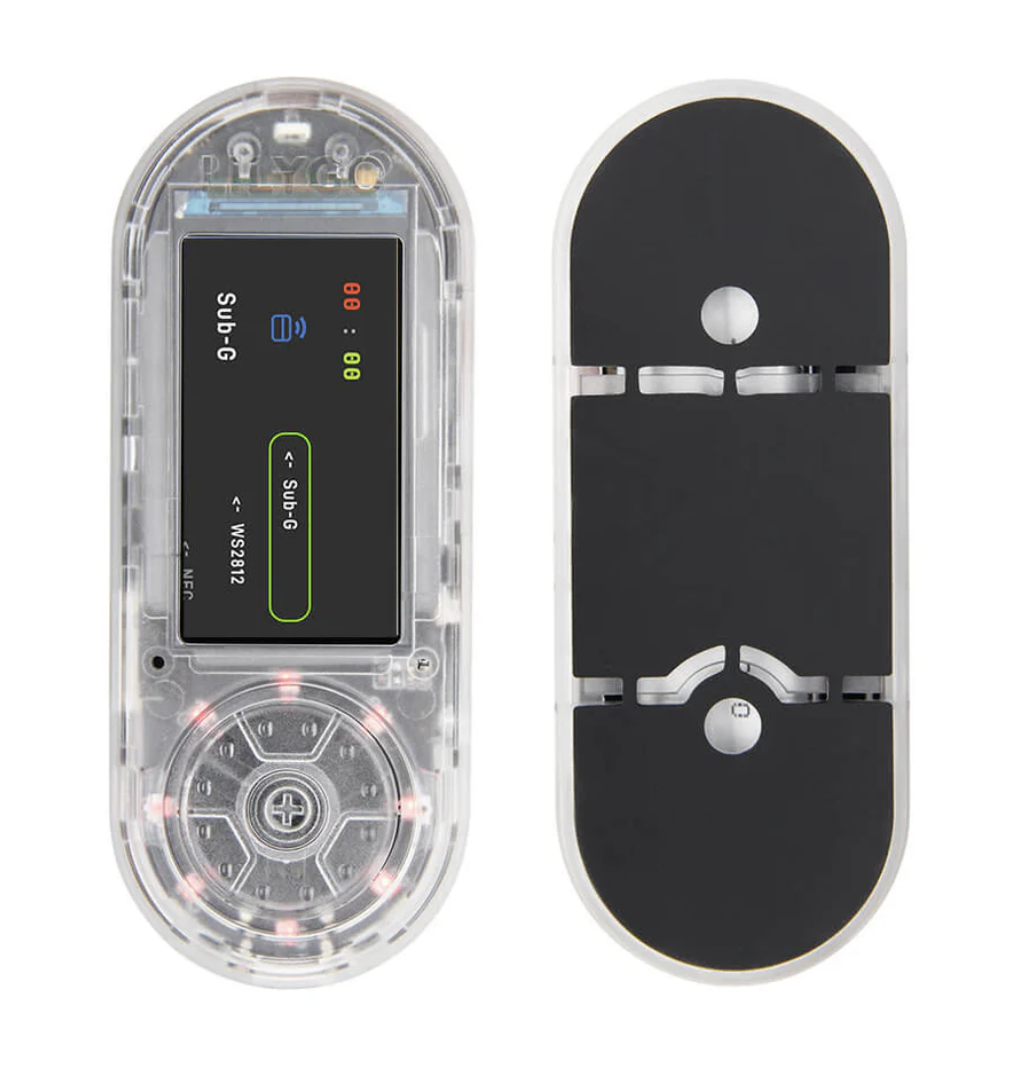
The LILYGO T-Embed CC1101 Plus looks harmless: tiny screen, rotary knob, clear case.
Flash Bruce firmware on it and suddenly it stops being a dev toy and becomes a pocket RF lab with opinions.
Under the transparent shell you’ve got an ESP32-S3, a Sub-GHz CC1101 transceiver, an nRF24L01 2.4 GHz module,
PN532 NFC/RFID, speaker, mic, RGB LEDs, battery and a decent IPS display.
Bruce sits on top of that and glues everything into one interface: Wi-Fi attacks, BLE spam, Sub-GHz play,
RFID cloning (for your own tags), IR tricks, FM mischief, NRF24 Mousejack experiments and more — all in one menu.
This guide is half-intro, half-field-notes: what the T-Embed CC1101 Plus is, what Bruce unlocks on it,
and how to turn the combo into a serious but legal RF playground.
LilyGO T-Embed CC1101 Plus
Meet the T-Embed CC1101 Plus — hardware tour
Think of the Plus version as the “everything-enabled” T-Embed: same body, extra teeth.
Core silicon: ESP32-S3 dual-core, 16 MB flash and 8 MB PSRAM. Enough RAM to run a chonky UI, network stacks,
RF modules and still have room for shenanigans.
Display & controls: 1.9″ 320×170 IPS TFT, driven by a rotary encoder with push-to-select.
The encoder is your D-pad: scroll lists, tweak frequencies, adjust gain without stabbing tiny buttons.
Sub-GHz radio: Texas Instruments CC1101, covering ~300–348 MHz, 387–464 MHz and 779–928 MHz.
That’s the band where remotes, sensors and random IoT chatter live.
NRF24L01 (Plus-only bonus): A dedicated 2.4 GHz transceiver used by Bruce for spectrum views,
jamming experiments and Mousejack-style keyboard/ mouse fun in lab conditions.
NFC/RFID: PN532 module supporting 13.56 MHz (NFC) and low-frequency tags,
giving you read/clone/emulate flows for tags you own or have permission to test.
Quality of life: 1300 mAh Li-Po, battery fuel gauge, USB-C, speaker (MAX98357A amp),
mic, WS2812 RGB LED strip, microSD slot and Qwiic connectors for expansion.
On its own, it’s a very capable hacker dev board. With Bruce on top, the hardware stops being “generic ESP32”
and becomes a defined toolkit with opinionated modules.
Enter Bruce — predatory firmware in a tiny shell
Bruce is an open-source, AGPL-licensed ESP32 firmware built for offensive security and red-team operations.
It targets boards like M5Stack, LilyGO and friends, and the T-Embed CC1101 Plus is on the “first-class citizen” list.
On the T-Embed CC1101 Plus, Bruce ties directly into:
The important part: Bruce gives one consistent UI and workflow. You’re not juggling random example firmwares —
you’re learning one mental model that spans Wi-Fi, BLE, RF, RFID and 2.4 GHz toys.
Flashing Bruce on the T-Embed CC1101 Plus (high-level)
There are plenty of step-by-step videos already. This is the 10,000-ft view so you know what’s actually happening.
Web flasher: Bruce ships an official web flasher. You open it in a Chromium-based browser, to find it just Click here, plug the T-Embed in via USB-C,
pick the correct “LilyGO T-Embed CC1101 / Plus” profile and let it push a prebuilt .bin.
Bootloader dance: To enter download mode you usually hold BOOT, tap RST, then release BOOT.
The board enumerates as an ESP32-S3 in flashing mode.
Serial flashing: Under the hood it’s doing an esptool.py write_flash to address 0x0
with a board-specific binary, matching your flash layout (16 MB here).
First boot: On first boot Bruce will initialize storage, create config, maybe do a short setup.
From then on you’re living in Bruce-land instead of demo-firmware-land.
Once that’s done, the “stock” T-Embed examples become optional. Your new home is the Bruce main menu.
This article is not a flashing tutorial. Always follow the official Bruce docs/videos and LilyGO docs.
First contact — safe things to do on day one
Before diving into jammers and weird NRF tricks, you want quick wins that are educational, safe and low-risk.
Wi-Fi recon: Use WiFi → Wardriving or scan modes to map APs in your own home/lab.
Log to SD and later shove the CSV into your SIEM or scripts.
RF spectrum peek: Go to RF → Spectrum, park on a band where you own a remote
(garage, outlet, sensor), press the button and watch the waterfall spike.
RF Scan/Copy on your own remotes:RF → Scan/Copy, record a packet from a remote you own,
inspect the frequency, bit rate and protocol guesses, then replay against your own device.
RFID lab:RFID → Read tag against your own NFC cards, tags or amiibo.
Save dumps to SD, try Emulate and see what your reader does.
IR fun: Take over your own TV with IR → TV-B-Gone.
Log the IR codes, compare with known protocol docs, and treat it as a decoding exercise.
Each of these flows is basically: observe → capture → replay/ emulate → document.
That pattern is the spine of responsible RF research.
Deep dive — CC1101, Sub-GHz and NRF24 modules
The T-Embed CC1101 Plus is interesting because it gives you both worlds: Sub-GHz with CC1101 and 2.4 GHz with NRF24,
wired directly into Bruce’s RF/NRF menus.
CC1101 Sub-GHz:
Scan/Copy: Listen on a given frequency, auto-detect simple OOK/ASK style protocols and capture pulses.
Custom SubGhz: Manually set frequency, modulation, data rate and deviation.
Perfect for experimenting with non-standard remotes or decoding weird devices.
Replay: Send captured frames back, with timing control. Good for lab replay tests against devices you own.
Jammer (Full / Intermittent): Generates strong square/PWM signals into the RF chain.
This should stay strictly inside your lab, against your own hardware, inside shielded or controlled environments.
NRF24 2.4 GHz (Plus-only candy):
2.4G Spectrum: Quick visualization of noisy channels, dongles, and keyboards.
NRF24 Jammer: Protocol-aware interference for testing how your own 2.4 GHz gear behaves under stress.
Mousejack: Attack logic for vulnerable 2.4 GHz HID dongles.
This absolutely requires explicit permission and a target that is part of a legit test scope.
From a learning perspective, this combo is gold: you can compare how low-data-rate OOK on 433 MHz behaves versus
2.4 GHz packet storms and HID traffic. Same device, two very different ecosystems.
Building a tiny RF lab around the T-Embed
The T-Embed + Bruce is the brain. Surround it with a few more toys and you’ve got a full radio workbench in a backpack.
Core stack
LILYGO T-Embed CC1101 Plus (with Bruce)
Dedicated Sub-GHz SMA antenna (433/868/915 MHz)
2.4 GHz antenna for NRF24
32 GB microSD (non-UHS, standard speed)
Support gear
RTL-SDR dongle (any decent one)
Raspberry Pi or laptop running SDR++ / GQRX
Some remotes and tags you own (garage, smart plugs, badges, NFC cards)
USB-C power bank for field sessions
Workflow idea
Baseline: find active bands with the RTL-SDR waterfall.
Zoom: park the T-Embed CC1101 on that band, use RF Spectrum and Scan/Copy.
Decode: export captures, analyze in Inspectrum/Audacity.
Validate: replay or emulate against your own hardware, log behavior.
It’s not about “hacking everything.” It’s about building repeatable experiments:
same input, same lab, same logs. That’s how you turn RF curiosity into reliable data.
Beyond basics — Wi-Fi, WebUI and distributed mischief
Once you’re comfortable with the UI, Bruce turns your T-Embed into a node in a larger offensive toolkit.
Wardriving + Wigle: Use WiFi → Wardriving to capture AP beacons
and then the SD Card manager’s Wigle upload helpers. Great for mapping signal landscapes in locations you’re authorized to test.
Evil Portal flows:WiFi → WiFi Atks → Evil Portal for captive-portal testing,
combined with deauth only against systems in your engagement scope.
Remote control with WebUI: Bruce exposes a WebUI where you can manage files, tweak HTML and interact with the device over Wi-Fi.
That means you can trigger experiments from your laptop without touching the rotary.
ESPNOW “Connect” mesh: Use Connect to send files/commands between Bruce-powered devices,
turning multiple boards into a swarm of little RF probes.
Integration with your SOC toys: Export logs and pcap-like data, correlate with your Suricata/Zeek outputs and
treat the T-Embed as a noisy but honest field sensor.
The goal is to stop thinking of this as a gadget and start treating it as another node on your engagement diagram.
Ethics, legality & staying out of trouble
Bruce is explicitly an offensive-security firmware. The T-Embed CC1101 Plus gives it a lot of teeth.
The line between research and crime is 100% in how you use it.
Scope first, toys later: Only target networks, tags, devices and RF systems you own or are explicitly authorized to test.
“I was just playing with my gadget” does not survive contact with a courtroom.
Jammers are for labs: RF jamming can be illegal or heavily regulated in many countries,
especially if you interfere with others. Keep jammer tests inside shielded boxes or clearly controlled environments.
Respect critical systems: Never aim RF experiments at alarms, medical gear, industrial controls,
or anything life-safety adjacent — even if the protocol looks trivial.
Report like a pro: If you find vulnerabilities as part of an engagement or bounty,
document clearly, minimize harm, and recommend fixes. “Cool hack” screenshots are useless without remediation.
Log everything: Keep time-stamped notes, config files and captures.
This helps in write-ups and also proves intent and scope if someone has questions later.
The hardware doesn’t care what you do with it. Your future clients, your reputation and your passport do.
Config → Brightness / Dim Time — battery-life tuning.
Config → Orientation — rotate the UI if you case-mod the device.
Treat this as a living cheat-sheet. As Bruce evolves, so will the menu tree — check the official wiki before relying on muscle memory.
Where to go next
The T-Embed CC1101 Plus with Bruce is basically a signal Swiss-army knife.
You won’t “finish” it — you’ll grow with it.
Good next steps:
Build a catalog of your own remotes, tags and devices with frequencies, protocols and captures.
Mirror those RF captures with SDR recordings and learn to decode them by hand.
Use Bruce’s WebUI and scripting to automate small recon tasks in your lab.
Tie the T-Embed into your bigger tooling: SIEM, dashboards, notebooks, whatever speaks CSV/JSON.
In the end, the device is just a bridge into the invisible layer around you.
The art is learning to see patterns in the noise — and to respect the systems you’re probing while you do it.